- How Do You Automate Support Replies With AI Without Getting Order Details Wrong?
- What Are Customer Support AI Workflows?
- Why Traditional Customer Support Slows Businesses Down
- How AI Workflows Improve Customer Support
- Common Customer Support AI Workflows Businesses Use
- Industries Seeing the Biggest Impact
- Choosing the Right Customer Support AI Workflows
- Tools to Automate Customer Support Tasks
- Build a Support Experience Customers Actually Enjoy
- FAQ
How Do You Automate Support Replies With AI Without Getting Order Details Wrong?
Short answer: Pull order details live from your store or order system at the moment you reply, never from the AI’s memory. Verify the customer’s order ID and email, use retrieval (RAG) only for policy text, fill order fields from a locked template, and hand off to a human when confidence is low or a refund is large.
Wrong order details are the fastest way to lose trust in an automated reply. Here is the process that prevents it:
- Look up the order live, at reply time. Call your Shopify, WooCommerce or order management system (OMS) API when the message arrives, so status, tracking and amounts are current rather than remembered or guessed.
- Verify who is asking. Match the order ID and the email on the order before sharing anything. If they do not match, ask again or route to an agent.
- Use RAG for policy text only. Retrieval over your help articles is the right tool for return windows and shipping rules. It should never be the source for an order’s status, items or total.
- Lock the order fields in a template. Insert status, tracking link, delivery estimate and amounts directly from the API response, and let the AI write only the surrounding wording. The model never generates the numbers.
- Hand off to a human when it matters. Escalate on low confidence, missing or conflicting order data, and any refund above a threshold you set.
- Log every reply for QA. Store the reply together with the order data it used, so you can audit mistakes and tighten the rules over time.
What Are Customer Support AI Workflows?
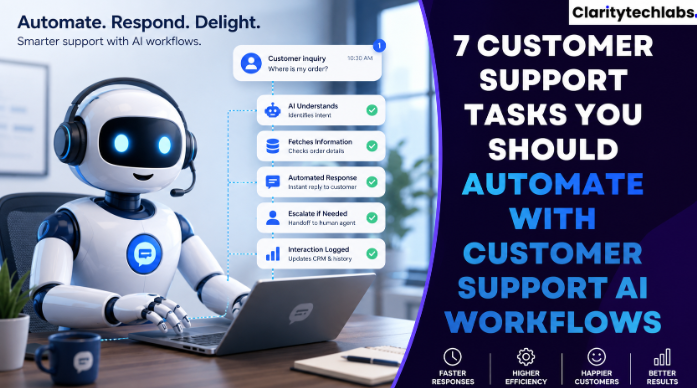
Think about your workflow as a series of connected actions that occur every time your customers reach out to you. Take for example your customer sending you a message about their order inquiry. Rather than reading the message, categorizing it, retrieving order data, and responding, all of that is done for you through your automated workflow thanks to artificial intelligence. The workflow is capable of:- Understanding the customer inquiry
- Identifying the customer using the CRM system
- Fetching the related order information
- Automatically responding to inquiries if possible
- Routing difficult cases to the correct support agent
- Logging all interactions automatically
Why Traditional Customer Support Slows Businesses Down
Most companies continue to operate with manual procedures that cause unwarranted delays. Support staff waste precious time:- Answering the same queries on a daily basis
- Retrieving customer information
- Jumping from one system to another
- Manually logging issues
- Following up on pending issues
How AI Workflows Improve Customer Support
But speed is not even the main benefit. The key here is providing a better experience for customers and employees alike. Let’s look at some of the greatest benefits for businesses that implemented AI-powered workflows.Faster First Responses
No one likes to wait for confirmation. AI-powered workflows identify incoming requests, gather data about the customer, and respond as quickly as possible. Even in cases where human intervention is necessary, the customer knows that the request has been processed and sent to the proper department.Proper Ticket Routing
Not all queries require intervention from the same department. Rather than manually routing a ticket, AI analyses a query and routes it to the appropriate department. The finance department will handle billing queries. Tech support will handle technical issues. The sales department will handle sales queries. It is such a small thing, yet it significantly reduces the need for transferring the query and, therefore, cuts down on processing time.Consistent Customer Experience
Each customer deserves consistent treatment. AI-powered workflows process queries according to pre-set algorithms every single time and give customers the correct information no matter what time of day it was sent.Improved Information for Human Representatives
The support representative does not have to spend half their time looking for information. The AI pulls all customer information, past interactions, orders, and account information even before the agent opens the ticket. The agents can use this extra time to solve the customers’ problems.Common Customer Support AI Workflows Businesses Use
Every business will have its unique set of support requirements; however, there are specific workflows that prove highly productive regardless of industry.FAQ Responses
Inquiries concerning shipment, prices, account access, scheduling appointments or returning a product can be immediately addressed. The customers get the required information without waiting for an agent to become available.Ticket Prioritization
All requests do not have the same level of importance. AI technology can recognize certain keywords or history of the customer to identify urgent requests automatically. Important requests go to the top of the list automatically.Customer Follow-Up
Follow-up after solving the problem usually gets overlooked. Using AI, businesses automatically send to the customers:- Satisfaction surveys
- Confirmation of resolution
- Product recommendations
- Summary of support
- Reminders
Knowledge Base Recommendations
Rather than requiring customers to browse numerous help articles, AI suggests the most relevant solution for the particular question of the customer. Most of the customers manage to solve their problems on their own without contacting support.Industries Seeing the Biggest Impact
Almost all customer-oriented businesses can get benefited through automation, but there are certain sectors that yield immediate results through automation. Those are:- SaaS businesses
- Healthcare facilities
- Retail stores
- Financial institutions
- Insurance firms
- Logistics companies
- Professional services
- Manufacturers
Choosing the Right Customer Support AI Workflows
But not all processes require automation right away. And the best way to start is to recognize repetitive activities taking the most amount of time. Here is the set of questions to ask yourself:- What do customers ask on a daily basis?
- At which point do you see the biggest delays in customer support?
- In what process does not much thinking take place?
- In which activity does copying take place?
Tools to Automate Customer Support Tasks
The right tool depends on your help desk, your channels and how much order data the AI must read. This table compares common options at a high level:
| Tool | What it automates | Works with | Best for |
|---|---|---|---|
| Zendesk | AI agents for chat and email, ticket routing, suggested replies | Large app marketplace and APIs | Teams already on Zendesk that need scale |
| Intercom (Fin) | AI agent that answers from your help content and hands off to agents | Intercom help desk, plus connections to other help desks | SaaS and online businesses that want fast chat resolution |
| Freshdesk | AI-assisted replies, ticket automation, self-service | Freshworks products and integrations | Small and mid-size teams that want an affordable help desk |
| Gorgias | Order-aware macros and automation for store support | Ecommerce platforms such as Shopify | Online stores where most tickets are order questions |
| HubSpot Service Hub | Chat agent, ticketing, knowledge base | HubSpot CRM | Teams that want support and sales data in one place |
| Tidio | Chatbot and live chat for common questions | Website and store plugins such as Shopify and WooCommerce | Small businesses starting with basic automation |
| Custom AI workflow (ClarityTechLabs) | Live order lookups, verification, locked templates and handoff rules built around your systems | Your OMS, CRM and help desk through APIs | Complex order data or rules that off-the-shelf tools cannot handle |
Features and integrations change often. Check each vendor’s current documentation before you decide. For a wider look at the build-or-buy decision, see our guide to choosing an AI agent builder platform.
|
Intelligent Customer Support Automation Elevate your customer support with AI workflowsClarityTech Labs helps businesses automate customer support workflows, reduce response times, and improve customer satisfaction with intelligent AI solutions integrated into your existing systems. Schedule a Consultation →Enterprise-ready solutions • Fast onboarding • Proven expertise |
Related: See how support automation fits into the bigger picture in our Workflow Automation guide — benefits, maturity stages, and how to get started.
Build a Support Experience Customers Actually Enjoy
Customers never remember the companies who kept them waiting but always remember those that quickly addressed their issues and made them feel comfortable. This is precisely what an effective Customer Support AI Workflow ensures for organizations. Here at ClarityTechLabs, we provide businesses with innovative intelligent support automation that integrates with your CRM, help desk, and other business processes. Our tools can help you make your support processes smooth and effective while freeing up your staff to focus on fostering better connections with customers. In other words, this is how long-term success starts!FAQ
Can AI answer customer questions about orders accurately?
Yes, if the order details come from a live lookup in your store or order system and are inserted through a locked template. Accuracy drops when the AI writes order facts from memory or from retrieved documents.
Should I use RAG for order status?
No. Use RAG for policy and help content such as returns and shipping rules. Order status, items, tracking and totals should come from an API call at the time of the reply.
When should an AI support agent hand off to a human?
Hand off when confidence is low, when order data is missing or conflicting, when the customer cannot be verified, and when a refund exceeds the threshold you set.
Which customer support tasks are easiest to automate first?
Start with high-volume, repeatable requests such as order status, FAQ answers, ticket routing and follow-ups. These have clear rules and low risk, so you can prove results before automating harder cases.
How do I keep AI support replies safe and auditable?
Verify the customer before sharing order details, restrict what the AI can read and do, and log every reply with the data it used so your team can review and correct it.